Practical Oracle FCC, ARCS, Data Integration & Financial Close guidance
22 January 2019
14 January 2019
What are FCCS Infolets?
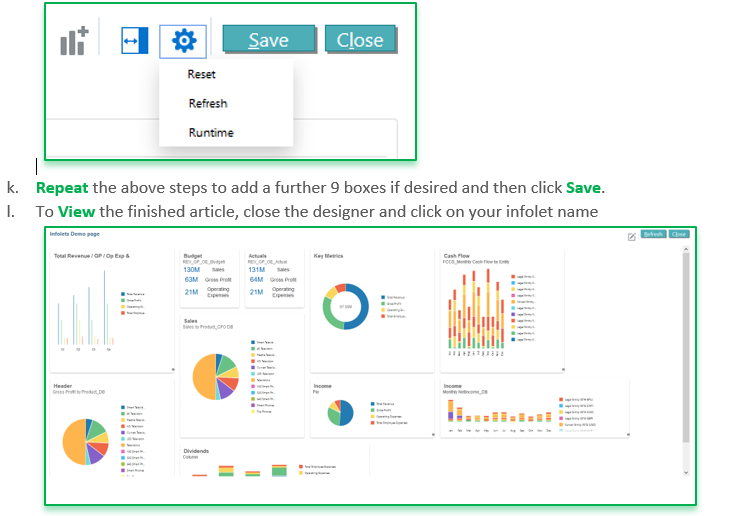
Infolets are a way to display Key high level static information that's essential for managing your business, please see the example below;
An infolet is made up of a series of boxes which you link to a data form they contain key information such as Sales, GM and Operating Expenses. The box can only display the static data included in the data form, these are used more as a quick reference to key information to help you manage your business.
Each infolet can display up to 10 boxes, each box is linked to a data form and can be sized as 1x1, 2x1, 3x1 & 2x2 Note 1x1 refers to the box size that spans one row and one column width = 170 pixels. You can choose to represent the data as text boxes size 1x1 or graphical and there are various chart option bar chart, doughnuts & pie charts etc.
How to create Infolets coming soon...
Check out more EPM/ERP blogs at www.Brovanture.com
https://brovanture.com/brovanture/news/
03 May 2017
Oracle EPM Cloud Partner Briefing
Some exciting news coming out of this weeks Oracle Partner Briefing, the highlights are to bring Parity with HFM by the end of the summer!, coming sooner is Cross Pod Integration, essentially it's like the HFM Workspace, i.e. for customers who have both FCCS and PBCS you can not only enjoy a single sign on, but a fully integrated workflow combining both applications on your landing page, a welcome update for Multi EPM Cloud customers.
FCCS
Current+1
Advanced Consolidation (Phase 1 i.e. Managed ownership)Configurable translation calculation and consolidation
Extended Custom dimensions
Cross Pod Integration
Close Manager integrations
Platform sizing and performance
Current+2
Process controlAdvanced Consolidation (Phase 2 i.e. Ownership register/Org by Period)
Close Manager (Monitoring tasks/Cloud Integrations)
Supplemental Data Manager(Integrations to on premises
Future Post 12 months
Journal Entry ModuleIntegration with any ERP
Recurring and Auto-Reversing
Single Click Create
Advanced Consolidations
Automatic Journaling
Data Lineage
Integrated XBRL from ERPCS
HFM Migration toolkit
The following is Brovanture’s take on Oracles general product direction. This document is for information purposes only and in no means is this document contractual. The future release of developments/functionality described remains at the sole discretion of Oracle.
25 April 2017
Oracle Hyperion Smartview Cascade Feature
Do you know about the Smart View Cascade Feature?
I recently delivered some training for a client who had been using HFM for many years and one of the key items that they thought would save them time was the Smart View Cascade feature.
Simply, the cascade feature copies the ad hoc tab and duplicates it with all the connection details etc. and enables you to change any dimension member which appears on the POV. i.e. changing the Scenario or even selecting a bunch of Entity members which makes duplication much faster.
On the Smart View Ad Hoc toolbar you will see the Cascade feature;
Select Cascade within same workbook;
Next, select the dimension member you want to replicate, i.e. a different scenario I have selected Budget, but you if desired you could pick multiple members and it will create a tab for each.
Click OK and it will add a tab for each selected dimension member, and even name the tab accordingly;
For assistance is using this functionality just contact the Brovanture support team 01483 685450 and they will be happy to assist.
To View All Brovanture's up and coming training courses visit: http://brovanture.com/training
21 April 2017
HFM Smartview Journals
Are you using HFM 11.1.2.4?
A helpful tip - You can make your life easier by working with Journals in Excel (Smart View)A few simple steps to install the SVFMJournalInstaller.svext file and you'll have the ability to create, review and post journals directly from within Smart View!
Once connected to your application, you will see the additional Journal menu, as shown below;
The functionality works in the same way as using HFM journals from within the workspace, including the ability to Post directly from Smart View;
For assistance is using this functionality just contact the Brovanture support team 01483 685450 and they will be happy to assist.
To View All Brovanture's up and coming training courses visit: http://brovanture.com/training
Subscribe to:
Posts (Atom)
Oracle EPM Financial Consolidation and Close 25.10 release – Journal Precision
Excited to share the 25.10 release sees a new feature for Journal precision , this is a welcome addition to the journal module in Financial ...
-
I ts be just over 6 months since my first blog on Forms 2.0 and I am excited to share the latest updates. Decommission of Support for Fo...
-
Excited to share the 25.10 release sees a new feature for Journal precision , this is a welcome addition to the journal module in Financial ...